Introduction
Microsoft Teams SBA and SBC integration addresses a specific failure mode: the branch can no longer reach the Microsoft cloud, but the office network, a local SBC and a local carrier connection are still available. Instead of leaving users without external calling, supported Teams clients register to the local SBA and make or receive PSTN calls through the SBC. Microsoft documents the pattern for Teams Phone Direct Routing survivability.
An SBA does not keep chat, meetings, presence, cloud voicemail or every Teams calling feature available. It protects local PSTN calling for prepared users and routes—an appropriate outcome for a reception desk, warehouse, clinic, retail branch or other operational site, but rarely for a remote worker on home broadband.
Table of Contents
- What Microsoft Teams SBA and SBC integration is
- How Microsoft Teams SBA and SBC integration works
- Key benefits and use cases
- Challenges and limitations
- Current developments and market signals
- Comparison with alternatives
- Future outlook
- Frequently asked questions
- SEO recommendations
What Is Microsoft Teams SBA and SBC Integration?
Direct Routing connects Teams Phone to a customer-provided, Microsoft-certified SBC. The SBC is the secure voice edge: it terminates the Teams-facing SIP connection, applies policy and interoperability rules, and connects to a SIP trunk, PBX or other telephony service. Microsoft’s Direct Routing planning guidance requires a supported SBC and supports carrier trunks, third-party PBXs and analogue telephony adapters on the telephony side.
The Survivable Branch Appliance is different. It is Microsoft distributable code that approved SBC vendors embed in firmware or supply as a separate virtual or hardware appliance. During normal service, Teams users authenticate and call through Microsoft 365. The SBA is prepared locally so that, when the cloud path fails, eligible clients can enter appliance mode and use the local SBC for PSTN calling. The SBA is therefore a local registrar and limited call-control component, not another general-purpose PBX.
| Component | Role in normal operation | Role during branch outage |
|---|---|---|
| Teams Phone and Teams client | Registers to Microsoft 365; applies tenant voice policy and uses Direct Routing for calls. | A supported client with the correct branch policy discovers and connects to the SBA. |
| Microsoft cloud | Provides core Teams Phone service, policy management, directory integration and cloud call control. | Is unreachable from the branch; cloud-dependent features remain unavailable. |
| SBA | Maintains the branch-survivability configuration and readiness. | Provides local registration and limited call control for supported local users. |
| Certified SBC | Secures and normalises SIP between Teams Direct Routing and carrier or PBX connectivity. | Carries signalling and media for local PSTN calls, and enforces the local routing plan. |
| Carrier SIP trunk or local PSTN path | Carries public calls under the branch’s carrier arrangement. | Must remain reachable independently of the failed cloud or WAN path. |
| Branch LAN, DNS, firewall and NTP | Connects endpoints and voice infrastructure. | Must remain healthy; an SBA cannot compensate for a branch-wide power, LAN or DNS failure. |
How Microsoft Teams SBA and SBC Integration Works
1. Connected mode: Teams Phone uses Direct Routing
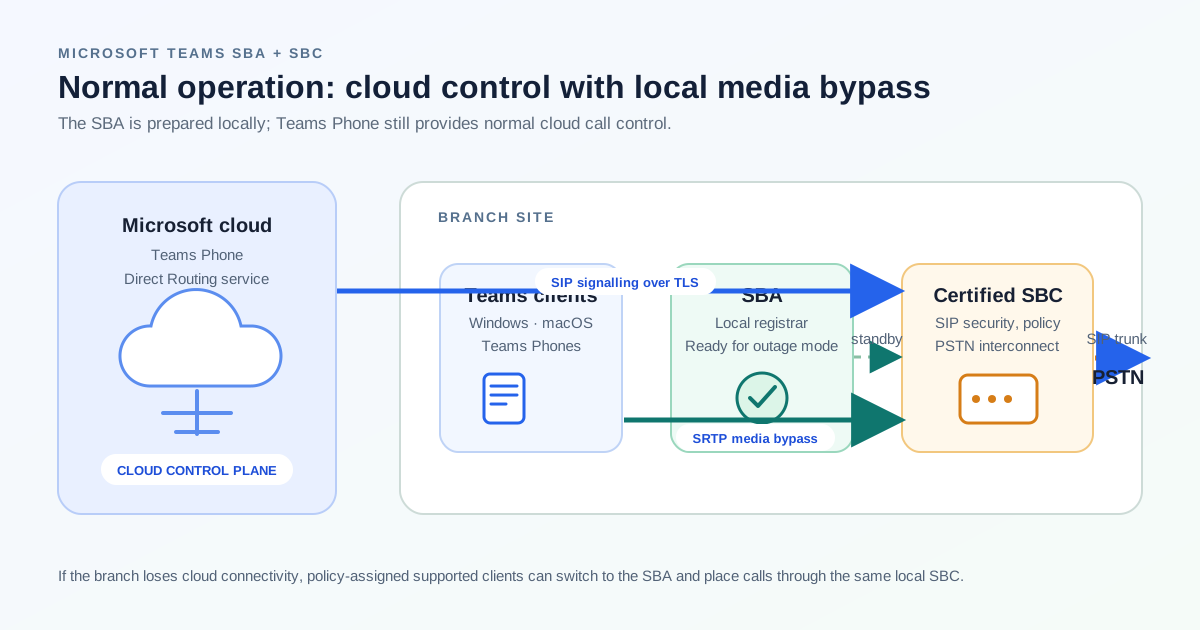
In normal operation, a user’s Teams client works with the Microsoft cloud. A PSTN call is routed according to the tenant’s voice-routing policy to a Direct Routing SBC, then from the SBC to the chosen carrier or PBX. SIP signalling is protected with TLS and the media leg uses secure real-time transport. With media bypass enabled, the client can send media directly to the SBC instead of traversing Microsoft’s cloud media processor; Microsoft describes this as a required condition for SBA.
2. Outage mode: the client moves to the local appliance
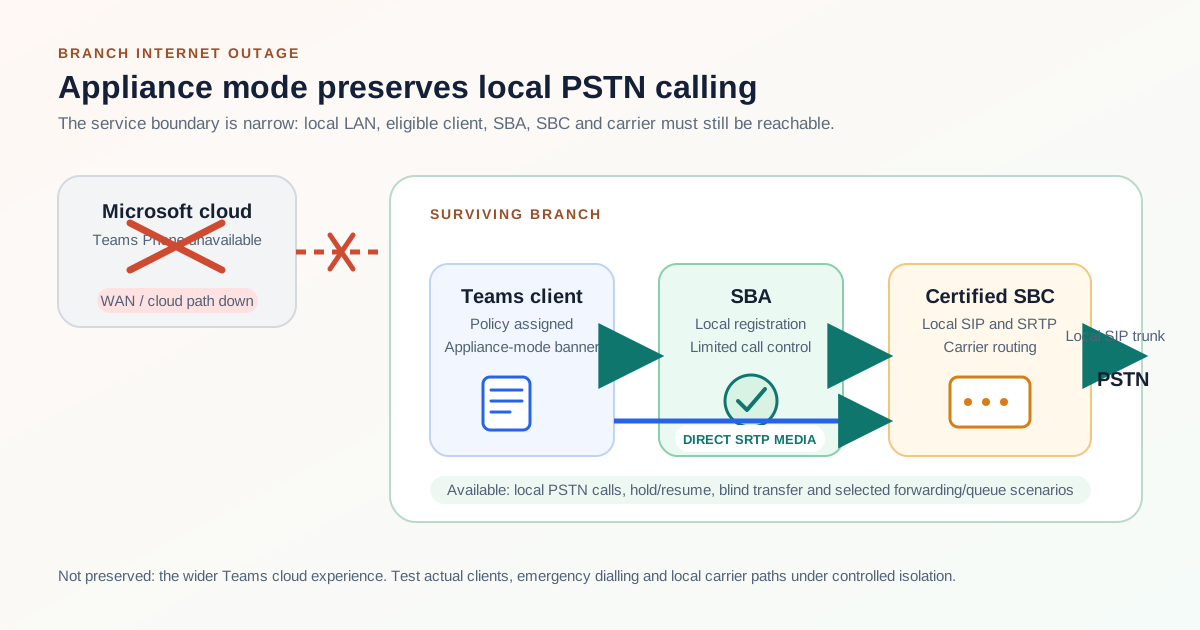
When the client cannot reach the internet but can still reach the appliance, it checks whether the user has a branch-survivability policy pointing to an available SBA. The client then enters appliance mode and displays a banner. Microsoft notes that this banner is the only user-interface indication that SBA mode is active. A missing banner means the client is not in SBA mode and the expected local calling path will not work.
For an outbound public call, the local sequence is Teams client → SBA → SBC → carrier/PSTN. An inbound call runs carrier/PSTN → SBC → SBA → Teams client. Media flows between the client and SBC, which is why media bypass and the branch firewall design are central to the deployment. Microsoft states that ongoing calls continue without user action when the failure is detected; restoration returns the client to normal operation after outgoing calls are complete, and the SBA uploads collected call data records.
3. Configuration and preconditions
The SBA workflow is PowerShell-based: create the SBA, create a branch-survivability policy, assign it to users, then register one Microsoft Entra ID application for the tenant’s SBAs. The Direct Routing SBC itself can be managed through the Teams admin center or PowerShell, but SBA configuration is not yet exposed in the admin center.
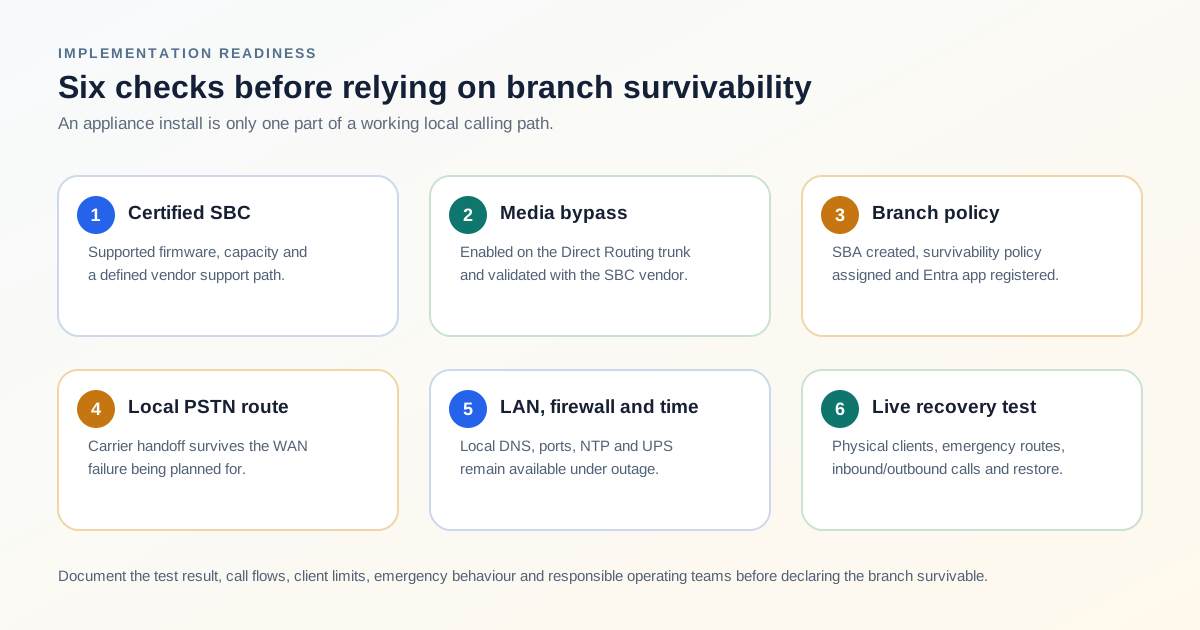
- Use an eligible, certified SBC. Microsoft support for Direct Routing is tied to the certified device and supported firmware; vendor support is the first escalation point for SBC issues.
- Enable media bypass. The SBC must support it and the Direct Routing trunk must be configured for it. Microsoft recommends a phased migration to bypass-enabled trunks where practical.
- Keep the local dependencies local. Design for local DNS resolution, LAN reachability, power/UPS, NTP and a carrier route that does not rely on the failed WAN circuit.
- Open and document the required paths. Microsoft lists TCP 3443, 4444 and 8443 from client to SBA; SIP/TLS 5061 or the configured port from SBA to SBC; UDP 123 for NTP; and TCP 443 from SBA to Microsoft 365. Verify current vendor documentation before change control.
- Plan capacity. Set a realistic concurrent-session limit on the SBC and reserve media ports. Microsoft recommends at least two SBC ports per concurrent call in its Direct Routing planning guidance.
- Test policy assignment and recovery. A configured appliance is not enough. Test a physical Windows or macOS client and a Teams Phone at the actual branch, including a controlled WAN isolation event.
Key Benefits and Use Cases of Microsoft Teams SBA and SBC Integration
The main benefit is proportionate resilience. Instead of duplicating a full cloud telephony environment at every site, an organisation can keep essential branch PSTN calling available while the upstream connection is repaired. The value is highest where local people and callers must still reach each other through familiar business numbers.
- Operational branches. Warehouses, plants, clinics, retail locations and branch offices can preserve a local public calling path when their WAN is unavailable.
- Reception and facility services. A front desk, security team, loading bay or site operations desk can keep placing and receiving essential calls without moving immediately to personal mobiles.
- Local regulatory or emergency requirements. Sites that need local breakout and carefully defined emergency routes have a stronger reason to evaluate a local SBC/SBA architecture, but must validate local emergency rules independently.
- Phased PBX migration. An SBC can interconnect an existing PBX and Teams Phone through Direct Routing; the SBA adds a local continuity option while the legacy estate is retired in stages.
- Branch autonomy during transport faults. The design isolates a single-site internet failure from a surviving local carrier connection. It does not isolate a common power failure, a carrier outage or a cloud service issue that also removes the necessary local prerequisites.
The decision belongs beside enterprise internet connectivity and network SLA planning. Base the cost case on the people and business workflow affected by lost calling, not on the number of appliances.
Microsoft Teams SBA and SBC Integration: Challenges and Limitations
Survivability is deliberately constrained. Design assumptions that are harmless in connected mode can stop branch calling from working after the failure. The most important limitation is endpoint eligibility: Microsoft lists Windows desktop, macOS desktop and Teams Phones. Appliance mode is for desktop clients on physical machines; web clients and virtual machines are not supported, and Teams mobile clients are not on the supported SBA-client list.
| Limitation | Practical consequence | Planning response |
|---|---|---|
| Only selected calling functions are available | PSTN calling, hold/resume, blind transfer, limited forwarding, local queue/auto-attendant redirection and local-user VoIP are supported. Collaboration services are not. | Publish an outage call-handling runbook and train reception, operators and supervisors on the reduced feature set. |
| Authentication has offline limits | Microsoft allows expired client authentication tokens for up to seven days in SBA mode, but a client that needs a new token cannot connect. Restarting Teams or the device can trigger this condition. | Test realistic outage duration and user behaviour. Keep business-critical clients active and define a fallback for long outages. |
| Prior discovery matters | A client cannot validate an SBA it has not connected to within the previous 24 hours. | Use a regular operational test and ensure staff use supported clients on-site before an actual incident. |
| Continuous Access Evaluation changes the window | Microsoft states that tenants using CAE tokens may have roughly 30 minutes of SBA operation because of CAE behaviour. | Assess the security trade-off with identity and risk teams; do not quietly disable CAE as a voice-only workaround. |
| Emergency behaviour is reduced | Emergency calls can be made, but location information is not shared. SBA does not support Emergency Call Routing Policies, and unmatched EMER dial strings can fail. | Validate emergency dialling, caller ID, carrier routing and local legal obligations during commissioning. |
| Local failure domains remain | No branch LAN, power, DNS, NTP, SBC or carrier path means no local continuity. | Include UPS, switch resilience, secure time source, monitoring and carrier failover in the design scope. |
There are also support and lifecycle considerations. Microsoft’s Direct Routing documentation makes certification significant: non-certified devices can fall outside normal support, and customers start SBC-related investigations with the vendor. Certificates, firmware, SIP options, DNS and port changes should be owned by named operational teams. The Direct Routing change log is worth placing on the team’s review calendar; certificate-authority changes and endpoint validation are the sort of external dependency that can surface during an otherwise routine renewal.
Current Technological Developments and Market Sentiment Trends
The direction of travel is cloud-managed calling with local control where it earns its keep. Direct Routing remains relevant for organisations that need their own carrier, PBX integration, specialised devices or regional routing. Cavell’s 2025 UC market study reported telephony-to-Teams connections rising from 31% to 41% year on year, while 77% of organisations still used more than one supplier—evidence of a hybrid, multi-provider market rather than a clean replacement of all voice infrastructure.
The operating conversation has shifted from appliance procurement toward software lifecycle and control-plane compatibility. Microsoft added an IPAddressVersion option for Direct Routing SBCs, but says media bypass is not supported with IPv6 SIP or media, nor with an IPv6 Teams client. Because SBA requires media bypass, confirm compatibility in the vendor support matrix before an IPv6 migration.
Vendor roadmaps also point toward virtual form factors. AudioCodes’ 2026 SBA release notes describe a Teams Direct Routing Survivable Branch Virtual Appliance and additional service logging. Virtualisation can reduce hardware footprint, but it does not remove the host, LAN, carrier-handoff or time-service dependencies. Buyers still need clear ownership of carrier, SBC, certificates, emergency calling and incident response.
Microsoft Teams SBA and SBC Integration Compared With Alternatives
| Approach | What it protects | Where it falls short | Best fit |
|---|---|---|---|
| Teams Phone Direct Routing with local SBA + SBC | Branch PSTN calls after loss of cloud connectivity, if the LAN and local carrier remain available. | Reduced feature set; supported endpoints only; local infrastructure and testing are required. | Business-critical branches with local PSTN breakout. |
| Centralised Direct Routing SBC only | Central policy and carrier consolidation while the WAN is available. | A branch WAN outage normally removes Teams-to-SBC reachability for that site. | Sites where outage call continuity is not material or WAN diversity is sufficient. |
| Dual internet/WAN circuits | Last-mile or provider path failure, depending on physical and routing diversity. | Does not help if both paths or the local network fail; does not replace carrier or Teams resilience planning. | All sites where business applications, including voice, depend on upstream connectivity. |
| Carrier call forwarding or mobile failover | Inbound reachability to a pre-set alternative number. | Limited outbound control, caller identity, transfer workflows and local site calling. | Small sites or as a secondary fall-back for critical published numbers. |
| Keep a legacy local PBX | Local extensions and PSTN calling while the PBX and carrier are healthy. | Does not preserve the Teams client experience, and prolongs PBX lifecycle and integration cost. | Complex legacy endpoints or a time-boxed migration coexistence period. |
| Managed Direct Routing service | Provider-operated SBCs, carrier integration and often multi-region availability. | Local survivability still needs a local SBC/SBA or an explicitly supported branch design. | Teams Phone buyers who prefer an operating partner but need clear responsibility boundaries. |
First identify the event to survive—single ISP loss, whole-branch WAN loss, local power loss, carrier loss or cloud-service loss—then map it to the appropriate control. Mature designs commonly combine WAN diversity, local SBA/SBC where justified, carrier forwarding, mobile contingency and a manual process.
Future Outlook for Microsoft Teams SBA and SBC Integration
Microsoft Teams SBA and SBC integration will remain a specialised architecture rather than a default setting for every Teams Phone user. The cloud calling experience is becoming easier to administer, but physical sites still have carrier demarcations, emergency obligations, operational phones and local failure domains. Those facts preserve a role for certified SBCs and targeted branch survivability.
- More virtual and managed deployments. SBA and SBC software will increasingly run on vendor appliances, hypervisors or managed platforms, while branch dependency checks remain the same.
- Tighter identity and certificate planning. Conditional access, short-lived credentials and public certificate changes will make operational readiness as important as initial configuration.
- Better observability, not less responsibility. Cloud portals, SBC telemetry, client call-quality data and carrier alarms should be correlated into one incident path rather than handled in separate silos.
- Resilience measured by business workflow. Buyers will assess whether reception, emergency contacts, local operators and critical inbound numbers still work—not simply whether a device reports healthy.
- Selective deployment. Organisations will reserve local survivability for high-consequence sites and use carrier forwarding or WAN diversity for lower-risk locations.
SEO Recommendations
Title suggestions and meta description
- Published title: Microsoft Teams SBA and SBC Integration: Branch Call Survivability Explained
- Alternative: Microsoft Teams Survivable Branch Appliance (SBA) and SBC Integration Guide
- Alternative: How Teams Phone SBA and Direct Routing SBCs Keep Branch PSTN Calls Working
- Meta description: Learn how Microsoft Teams SBA and SBC integration keeps branch PSTN calls working during outages, covering architecture, requirements, limits and alternatives.
Suggested internal links
- Session Border Controllers (SBCs) Explained — SBC security and interoperability.
- VoIP Fundamentals — SIP, SRTP and media-bypass basics.
- From PSTN to SIP: Modernising Business Telephony — local carrier and PSTN breakout.
- Enterprise Internet Connectivity Buyer’s Guide — WAN diversity and branch resilience.
- Singapore telecommunications providers — implementation partners and carriers.
Image placements and alt text
- Normal-operation architecture after the technical overview — alt text: “Normal Microsoft Teams Direct Routing call flow through cloud services, SBC and PSTN carrier.”
- Branch-outage call flow after appliance-mode explanation — alt text: “Branch outage call flow from Teams client to local Survivable Branch Appliance, Session Border Controller and PSTN carrier.”
- Readiness diagram before the benefits section — alt text: “Deployment readiness for Teams SBA and SBC integration covering certification, media bypass, branch policy, local carrier, firewall and testing.”
Additional long-tail keyword opportunities
Microsoft Teams SBA requirements; Teams Direct Routing branch survivability; Microsoft Teams local PSTN failover; SBA media bypass requirements; Teams Phone internet outage calling; Microsoft Teams SBA supported clients; SBC and SBA emergency calling limitations; Direct Routing SBA versus redundant internet.
Find a Teams Phone and SBC implementation partner
Compare Singapore telecommunications providers and system integrators for Direct Routing, SIP trunking, SBC design, branch survivability and voice-network readiness.
Browse telecommunications providers
Frequently asked questions
What is a Microsoft Teams Survivable Branch Appliance?
A Survivable Branch Appliance is Microsoft-provided software distributed through supported SBC vendors. It provides local registration and limited call control so eligible Teams users at a branch can make and receive PSTN calls if their cloud connection fails but the branch LAN, SBC and PSTN route still work.
Does Microsoft Teams SBA require an SBC?
Yes. The SBA works with a supported, certified Session Border Controller. The SBC provides the local PSTN connection and, with media bypass enabled, the direct media path between the Teams client and the local voice edge during an outage.
Which Teams clients work with an SBA?
Microsoft lists Teams Windows desktop, Teams macOS desktop and Teams Phones. SBA appliance mode is supported on desktop clients running on physical machines; web clients and virtual machines are not supported. Teams mobile clients are not listed as supported SBA clients.
Will all Teams Phone features work during an SBA outage?
No. SBA mode focuses on local PSTN calling. Supported functions include PSTN calls, hold and resume, blind transfer, limited forwarding, local queue or auto-attendant redirection and certain local-user VoIP calls. Cloud collaboration and several advanced calling functions remain unavailable.
Does an SBA solve every branch outage?
No. It does not solve a loss of local power, LAN, DNS, SBC, carrier connection or required client policy. It is also not a replacement for a diverse WAN design, an alternative carrier path or emergency-call planning.
Sources and further reading
- Microsoft Learn: Survivable Branch Appliance (SBA) for Direct Routing
- Microsoft Learn: Plan Direct Routing
- Microsoft Learn: Configure media bypass with Direct Routing
- Microsoft Learn: Connect an SBC to Direct Routing
- Microsoft Learn: What’s new in Direct Routing
- Cavell: UC Market Evolution Report 2025 — five takeaways
- AudioCodes: Microsoft Teams Direct Routing SBA release notes
- sbc session border controller explained
- voip fundamentals
- pstn to sip trunking
- Enterprise Voice Calls: VoIP, IPPBX, PBX and Cloud PBX Integration
- Modern Business VoIP Technologies: UCaaS, Cloud PBX, Hosted PBX, Call Routing, and Failover
- Types of Enterprise Internet Connectivity: A 2026 Buyer's Guide
- network sla explained