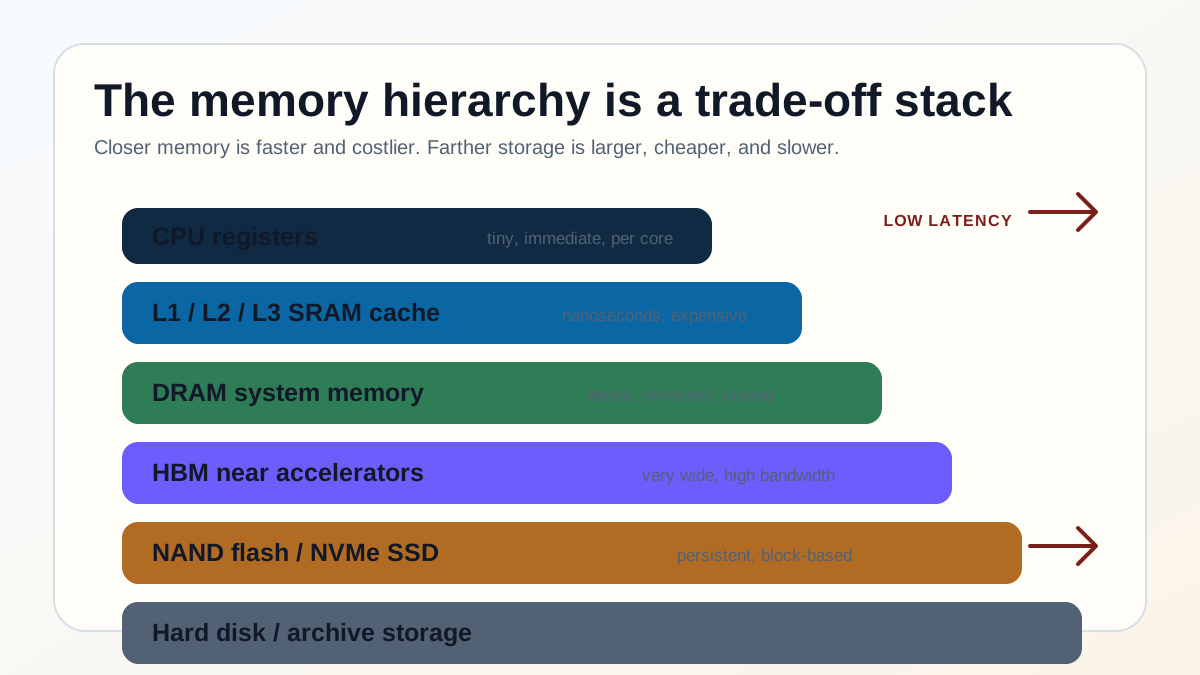
A computer does not have one kind of memory. It has a ladder. At the top are CPU registers and SRAM cache, built for immediate access by the core. Below them sits DRAM, the main memory that operating systems and applications treat as active workspace. Below that are SSDs, hard disks and remote storage, which preserve data when power is off but respond far more slowly.
The same ladder explains why GPU architecture is so memory-sensitive, why AI compute infrastructure spends so much money on HBM and interconnects, and why large language model serving can be constrained by KV-cache memory rather than raw arithmetic.
Why the hierarchy exists
Every memory technology trades three things against each other: latency, capacity and cost per bit. The fastest structures are close to the processor and built from many transistors per bit, so they are expensive and small. The largest structures pack more bits into less silicon or onto magnetic media, but they take longer to read and write.
That trade-off is physical, not just commercial. A CPU can reach a register because it is inside the execution pipeline. It can reach L1 cache because the cache is on the same die and designed for speed. It can reach DRAM only after crossing memory controllers, channels and modules. It can reach an SSD only after crossing a storage protocol and waiting for NAND flash cells to be read. The farther down the hierarchy data sits, the more the system must hide waiting time through caching, prefetching, batching and parallelism.
Memory and storage tiers compared
| Tier | Typical role | What buyers should remember |
|---|---|---|
| CPU registers | Immediate operands and execution state inside the CPU core. | Fastest tier, tiny capacity, invisible to ordinary infrastructure sizing. |
| L1/L2/L3 SRAM cache | Recently used instructions and data kept near CPU cores. | Cache misses are a major reason code that looks simple can run slowly. |
| DRAM / system RAM | Main active workspace for operating systems, applications, databases and virtual machines. | Capacity matters, but memory channels, bandwidth and NUMA placement also affect performance. |
| HBM | Very high-bandwidth memory placed close to GPUs and AI accelerators. | Critical for AI and HPC because accelerators can starve if weights and activations cannot be supplied quickly enough. |
| CXL-attached memory | Expandable or pooled memory attached through a coherent interconnect. | Useful for capacity expansion and pooling, but it is not as close as local DRAM or HBM. |
| NAND flash / NVMe SSD | Persistent storage for applications, files, databases, models and spill data. | Fast for storage, slow compared with DRAM; random latency still matters. |
| Hard disk / archive storage | Large, low-cost storage for backup, archive and sequential workloads. | Mechanical latency makes HDDs poor for interactive random-access workloads. |
How the main tiers work
Registers and SRAM cache
Registers are the CPU's immediate working slots. Cache is the next closest layer, usually implemented with SRAM cells. SRAM is fast because it holds state as long as power is applied and does not need the constant refresh cycle that DRAM does. The trade-off is area: an SRAM bit uses more transistors than a DRAM bit, which is why caches are measured in kilobytes or megabytes, not hundreds of gigabytes.
Cache works because programs usually show locality. They reuse the same instructions and data, or touch nearby addresses soon after touching one address. When that prediction is right, cache hides the slower layers. When it is wrong, the processor waits for data to come from farther down the stack.
DRAM
DRAM is the main memory tier in ordinary servers, laptops and desktops. A typical DRAM cell stores a bit using a transistor and a tiny capacitor. The capacitor leaks charge, so the system must refresh DRAM periodically. DRAM is slower than SRAM but much denser, which is why it can provide the large working memory that operating systems, applications, virtual machines and databases expect.
For infrastructure teams, the headline capacity is only the start. Memory channels, DIMM population, NUMA topology, CPU generation and workload access pattern can decide whether the system is bandwidth-limited, latency-limited or simply short of capacity.
NAND flash, SSDs and hard disks
NAND flash stores data as charge trapped in a cell, which allows far higher density than DRAM and keeps data without power. SSD controllers hide much of the complexity through wear levelling, error correction, parallel channels and caching. NVMe SSDs can be extremely fast by storage standards, but they remain orders of magnitude slower than DRAM for random access.
Hard disks sit even lower in the hierarchy. They are still valuable for low-cost bulk storage, backups and sequential reads, but a mechanical arm and rotating media cannot behave like semiconductor memory. A design that depends on frequent random HDD access will feel slow no matter how fast the CPU is.
HBM near accelerators
High Bandwidth Memory stacks DRAM dies close to a GPU or accelerator and connects them over a very wide interface. The point is not only capacity. The point is feeding thousands of parallel execution units. NVIDIA's GB200 NVL72 rack-scale system, for example, lists 13.4 TB of HBM3E and 576 TB/s of aggregate GPU memory bandwidth across 72 Blackwell GPUs.
This is why accelerator purchasing cannot be reduced to FLOPS. If the model, simulation or database operation cannot get data into the compute units quickly enough, the expensive arithmetic units wait. In production AI, memory capacity, memory bandwidth, GPU-to-GPU interconnect and batching policy can matter as much as peak compute.
AI and the memory wall
Large language model inference makes the hierarchy unusually visible. Model weights must be read repeatedly during generation, and long-context workloads also maintain a key-value cache for prior tokens. As contexts grow, KV-cache memory can become large, dynamic and hard to pack efficiently.
The PagedAttention paper behind vLLM describes this directly: serving many LLM requests requires batching, but the KV cache for each request grows and shrinks dynamically, so inefficient memory management wastes capacity through fragmentation and duplicated data. The paper reports 2x to 4x throughput improvement against earlier systems at similar latency by managing KV cache with paging-inspired techniques.
The operational lesson is simple: AI performance is a memory-system problem, not only a GPU problem. A deployment may need more HBM, more GPUs, a faster interconnect, better batching, smaller quantised weights, shorter context windows, smarter KV-cache placement, or storage that can absorb cold data without damaging tail latency.
CXL and memory pooling
Compute Express Link, or CXL, is an industry interconnect intended to let processors and devices share memory more coherently than ordinary storage or network paths. It does not make remote memory identical to local cache or HBM, but it creates a useful tier between local DRAM and slower storage for some capacity-constrained workloads.
The CXL Consortium says the CXL 4.0 specification increases bandwidth from 64 GT/s to 128 GT/s, supports bundled ports and enhances memory reliability, availability and serviceability features. For buyers, the practical question is whether a workload benefits from memory pooling enough to justify the extra platform complexity, latency profile and vendor maturity risk.
Buyer checks
Common misconceptions
- More RAM is not always faster. Extra capacity helps only if the workload was running out of memory or paging. Bandwidth, channels and locality still matter.
- An SSD is not RAM. NVMe storage is fast compared with disks, but it is still much slower than DRAM for random access.
- HBM is not ordinary server memory. It is a high-bandwidth accelerator memory tier, useful when compute units need massive data flow.
- CXL does not erase the hierarchy. It adds another tier that can expand or pool memory for suitable workloads.
- AI bottlenecks are not only compute bottlenecks. Memory bandwidth, KV-cache capacity, interconnect and scheduling can dominate real inference performance.
Planning memory-heavy AI or infrastructure workloads?
Compare Singapore AI computing providers, cloud specialists, data-centre operators and technology vendors who can help size memory, storage, GPU and interconnect requirements.
Frequently asked questions
What is the computer memory hierarchy?
The computer memory hierarchy is the ordered set of memory and storage tiers in a system, from CPU registers and cache to DRAM, HBM, SSDs and hard disks. Higher tiers are faster and smaller; lower tiers are slower, larger and cheaper per bit.
What is the difference between RAM and storage?
RAM is active working memory used by running programs and usually loses data when power is removed. Storage, such as SSDs or hard disks, keeps data persistently but responds much more slowly than RAM.
Why is cache faster than DRAM?
Cache is built from SRAM and sits on or very close to the processor die, so it can be accessed with very low latency. DRAM is denser and cheaper per bit, but it sits farther away and requires refresh and memory-controller access.
Why is HBM important for AI?
HBM gives GPUs and AI accelerators very high memory bandwidth close to the compute units. That matters because model weights, activations and KV-cache data must be supplied quickly enough to keep thousands of parallel execution units busy.
What is CXL memory?
CXL memory is memory attached through the Compute Express Link interconnect. It can help expand or pool memory across devices and hosts, but it remains a distinct tier with different latency and operational characteristics from local DRAM or HBM.
Why do LLMs need so much memory?
LLMs need memory for model weights, activations and the key-value cache used to remember prior tokens during generation. Long contexts and high concurrency increase KV-cache pressure, which is why serving performance often depends on memory management, not only compute.
Sources and further reading
- NVIDIA: GB200 NVL72 specifications
- arXiv: Efficient Memory Management for Large Language Model Serving with PagedAttention
- Compute Express Link Consortium
- NVIDIA CUDA C++ Programming Guide
Related resources
Go deeper on this topic
Knowledge base
- Object vs Block vs File Storage Explained
- GPU Architecture Explained: How Graphics Cards Work
- AI Compute Explained: GPUs, Accelerators, Clusters and Capacity Planning
- Inside Large Language Models: How the Engines Behind ChatGPT, Claude, and Gemini Actually Work
- AI Data Centre Infrastructure: Power, Cooling and GPU Cluster Demand
- AI Data Centre Cooling: Liquid Cooling for High-Density Racks
- Cloud Computing Explained: IaaS, PaaS, SaaS, Hybrid and Landing Zones
Vendor directories
Research cluster
Related analysis
Recent TechDirectory Insights coverage from the same research cluster.